
IRS Notice CP53E – What It Means (and What to Do)
You may have seen recent news about IRS Notice CP53E—or maybe you’ve even received one yourself. We’ve seen a few, so here’s what you need to know.
First—don’t panic
Getting a CP53E notice does not automatically mean something is wrong with your return. This notice is generally sent when the IRS can’t process a refund by direct deposit—often because bank information is missing, incorrect, or rejected. That said, some notices have been issued in error, even to taxpayers who aren’t expecting refunds.
Why this is happening more this year
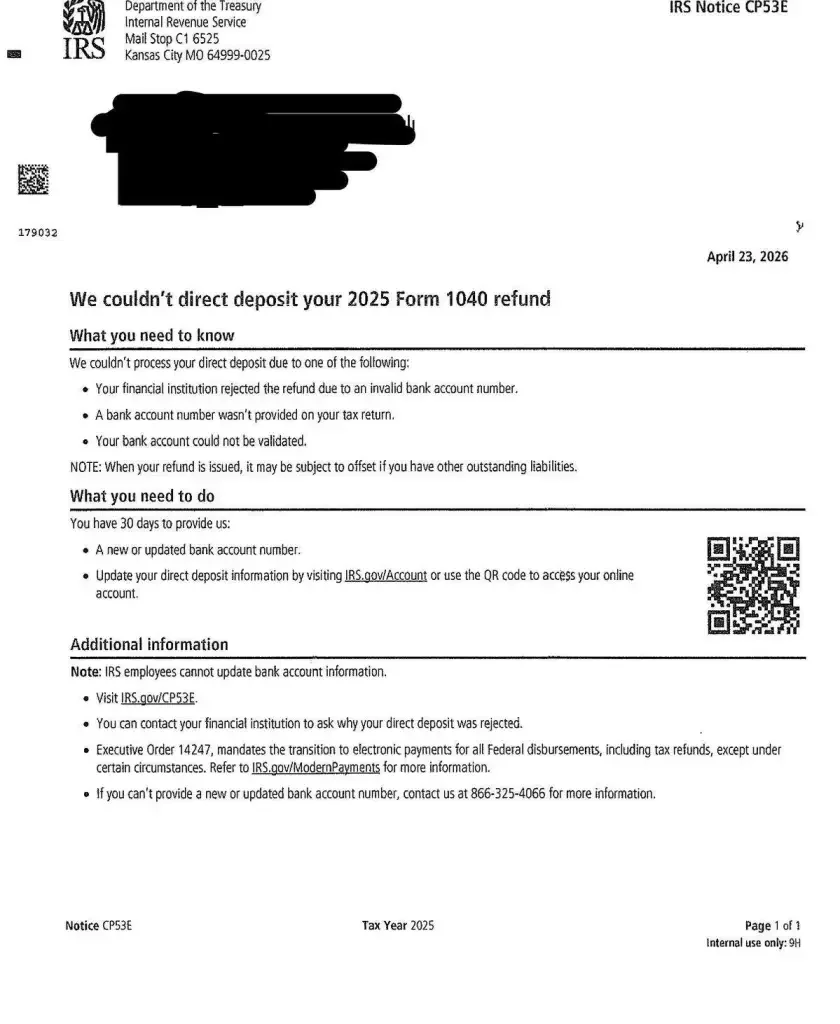
The IRS is in the middle of a shift away from paper checks and toward electronic payments. Because of that change, more notices like CP53E are being generated automatically—even when they don’t fully apply to the taxpayer’s situation.
What you should do
If you receive a CP53E notice:
Start by logging into your IRS online account (type IRS.gov directly into your browser)
Check whether the notice actually applies to you
If you are expecting a refund, you may need to update your bank information
If you intentionally did not include bank information because you prefer a paper check, you generally do not need to take any action—the IRS will issue a paper check automatically
Keep in mind this can take about 6–8 weeks
If you are not expecting a refund and everything looks normal, you most likely can ignore the notice after you confirm your account status
A quick word on scams
Unfortunately, scammers are taking advantage of the confusion. Some fake notices look very convincing and may include links or QR codes.
Even legitimate IRS notices can include QR codes—but fake ones can too
The safest approach is to avoid scanning codes or clicking links
Always go directly to IRS.gov and log in from there
Our recommendation
If you receive any tax notice (including this one), please forward it to us. We’re happy to take a quick look and confirm whether any action is needed.